Coreball – Play Core Ball Game Online Free
ONE CLICK. PERFECT TIMING.
Ready for Coreball?
Find your rhythm. Aim for the gaps.
How far can you go?
Free to play · No download needed
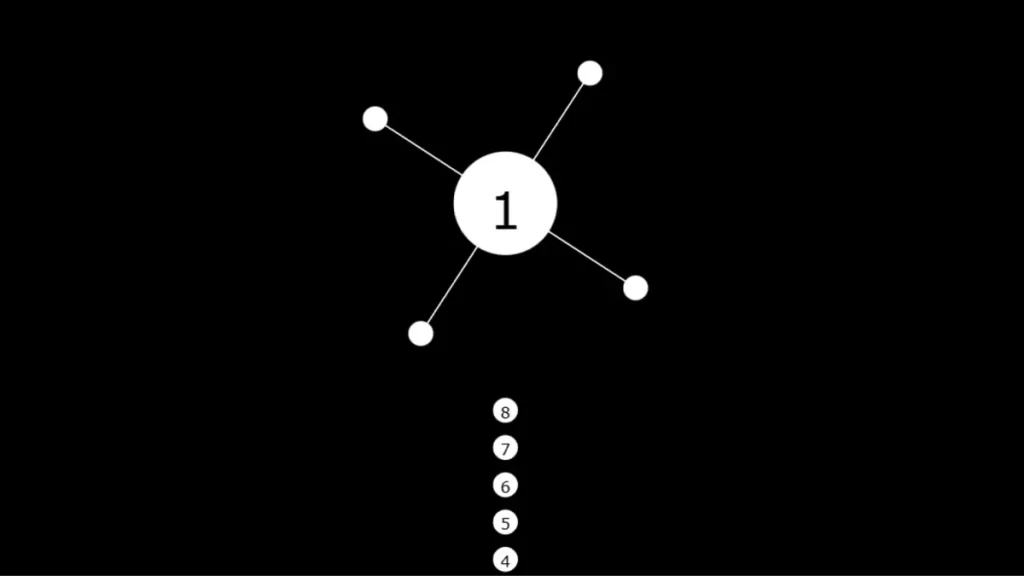
Coreball is a free online timing game: shoot balls into a rotating core without hitting the balls already attached. Select Play Coreball above to start. No download or account is required.
How to Play Coreball
1. Start the game. Select the green Play Coreball button. If the game’s own start screen is still visible, select its play button inside the game area.
2. Watch before shooting. Look at the rotation and the spaces between attached balls. Your shot needs an empty landing position when it reaches the core.
3. Click or tap inside the game. Each shot sends a ball toward the core. On a computer, use your mouse; on a touchscreen, tap the playing area.
4. Finish the remaining balls. Attach all the required balls without a collision to complete the level. If you hit an attached ball, retry the current challenge and adjust your timing.
Timing Tips for Difficult Levels
Allow for the ball’s travel time. The gap you see when you click will move before the ball arrives. If you keep hitting the same edge of a gap, try releasing the next shot a little earlier or later rather than repeating the identical timing.
Choose a wide gap first. More space gives you a larger margin for error. As you add balls, reassess the remaining gaps instead of assuming the same interval will stay safe.
Observe the current level’s movement. Watch a complete rotation before a difficult attempt. Use a steady rhythm only while the movement remains predictable; pause and observe again if the pattern changes.
Slow down for the final shots. A nearly completed level has less free space. Waiting for the next safe opening is usually more useful than clicking repeatedly.
Change one thing after a collision. Try a different gap or change the release timing. This makes it easier to identify what caused the failed attempt.
Coreball Levels and Progress
Use the level number displayed inside the game to identify your current challenge. Ball counts, attached-ball positions, and movement determine how much room you have for each shot. A strategy that works on one level may need adjustment on the next.
If you get stuck, note the displayed level and observe which shot causes the collision. Rebuild your timing from the first ball instead of speeding up the entire sequence. The last few shots often need more deliberate spacing.
Before using RESET inside the game, make sure you intend to restart progress. If your browser retains your progress, clearing site data or switching browsers may remove or separate that saved state. There is no account-based progress transfer on this page.
If Coreball Does Not Start or Respond
Launch screen still showing: select Play Coreball, then click inside the game area. Clicking article text or an advertisement does not control the game.
Blank game area: check your connection, allow the page to finish loading, and reload once. Keep JavaScript enabled. If an extension blocks the game, check its site-specific settings rather than disabling your browser’s security protections.
Clicks are not registering: make sure you are clicking within the playing area. On a small screen, scroll until the controls are fully visible and avoid placing your finger over browser controls.
Movement is stuttering: close unnecessary busy tabs and keep the game tab visible. Try an updated browser. Avoid clearing site data as your first troubleshooting step because it may remove saved progress.
Playing on Desktop, Mobile, or Chromebook
Coreball runs in the browser and uses click or tap controls. A larger screen can make the gaps easier to see, while a phone or tablet lets you play with touch controls. Network restrictions at school or work determine whether the page is accessible; “unblocked” does not guarantee access on every network.
For a different kind of keyboard challenge, explore our typing games guide.
Frequently Asked Questions
Is Coreball free to play?
Yes. The game on this page is free and runs in your browser without an account or installation.
Can I play on a phone or Chromebook?
Use a modern browser with JavaScript enabled. Click inside the game on a computer, or tap the game area on a touchscreen. School and workplace network rules may restrict access.
What happens if my ball hits another ball?
A collision ends the current attempt. Try the level again and change the timing of the shot that caused the collision.
Why does a shot miss a gap that looked clear?
The core keeps moving while your ball travels toward it. Time the shot for where the empty space will be when the ball arrives, and adjust slightly earlier or later after a collision.